


Deconstructing AI: How LLMs, Agents, and MCP Servers Work Together

Updated: Aug 7
When you type a complex request into a modern AI system, it doesn’t just generate text—it orchestrates a symphony of specialized tools, protocols, and APIs to get the job done.
To understand how Large Language Models (LLMs), Agents, the A2A Protocol, and MCP Servers work together, we will follow a single, practical use case from start to finish.
Overview
The diagram below maps out the exact lifecycle of a user request as it traverses the different layers of a modern autonomous AI network.
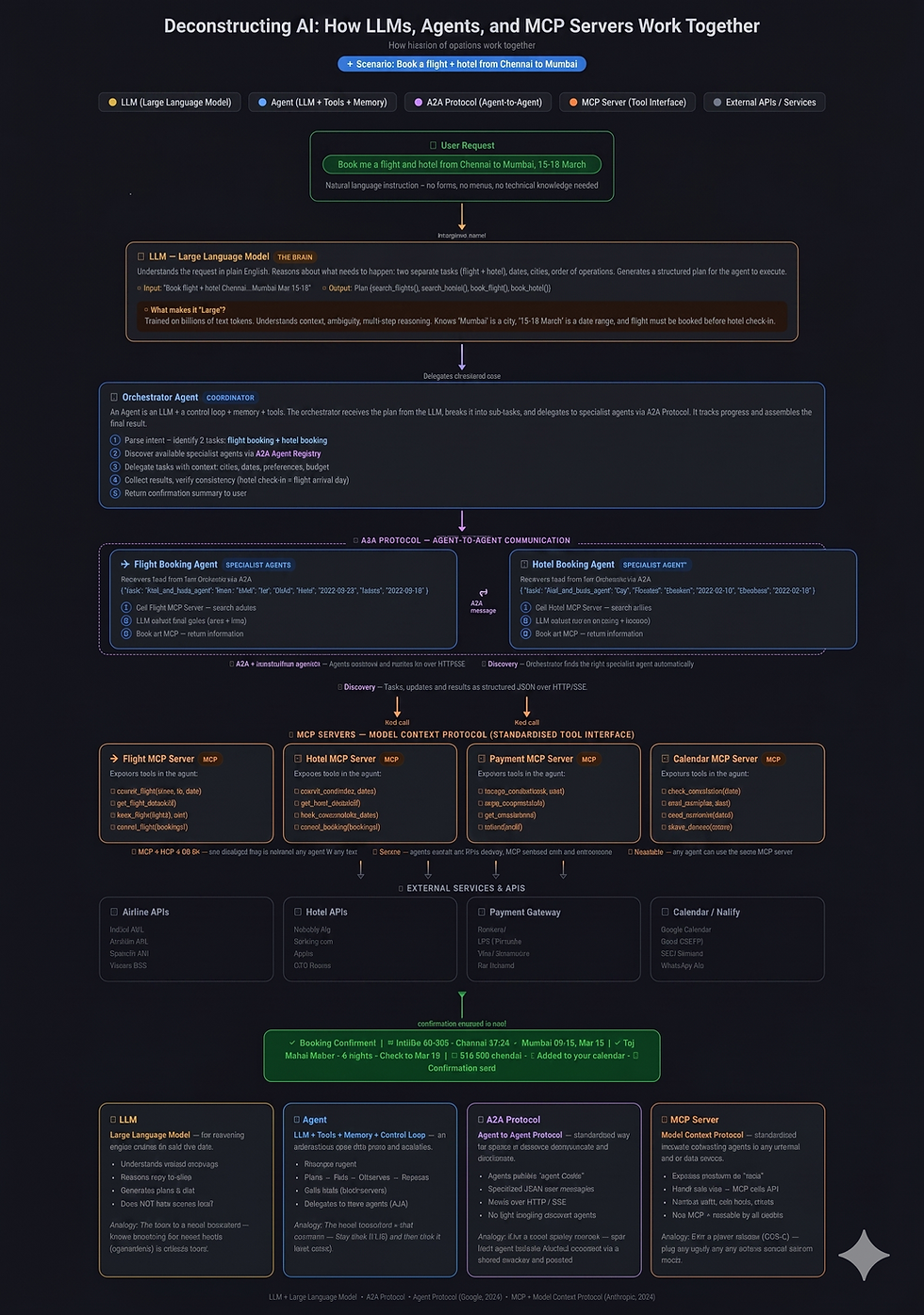
The Scenario
Imagine a user types the following natural language request into an AI assistant:
"Book me a flight and hotel from Chennai to Mumbai, 15–18 March"
The user provides no forms, uses no drop-down menus, and requires no technical knowledge. Here is the step-by-step process by which the AI architecture processes and fulfills this request.
1. The LLM: Interpreting Intent (The Brain)
The journey begins with the LLM (Large Language Model). Trained on billions of text tokens, the LLM acts as the "brain" of the operation. It doesn't take action on its own; instead, it reasons, handles multi-step logic, and understands context.
Input: The raw natural language text.
Processing: It identifies the intent (booking), the entities (Chennai, Mumbai, dates), and the order of operations (flights must be booked before hotel check-in).
Output: It generates a structured, delegated plan for the rest of the system to execute.
2. The Orchestrator Agent: Managing the Workflow
The LLM hands its structured plan to an Orchestrator Agent. An agent is essentially an LLM wrapped in a control loop with memory and access to tools.
Task: The Orchestrator acts as the overall coordinator. It breaks the user's request into two distinct sub-tasks: Flight Booking and Hotel Booking.
Delegation: It cannot execute these tasks itself, so it must find and delegate them to Specialist Agents.
3. A2A Protocol: Agent-to-Agent Communication
To delegate the sub-tasks, the Orchestrator uses the A2A Protocol. This is a standardized way for autonomous agents to discover, communicate, and collaborate with one another.
Discovery: Agents publish "Agent Cards" advertising their capabilities. The Orchestrator uses these to find the right specialists automatically.
Communication: The Orchestrator sends structured JSON messages over HTTP/SSE to the Specialist Agents (e.g., sending a task to find a flight from "MAA" to "BOM" for specific dates).
Analogy: Think of A2A as the communication network within a large travel agency, where the lead consultant passes specific tasks to local market specialists via a shared directory.
4. Specialist Agents: Executing Domain-Specific Tasks
The A2A protocol routes the tasks to two dedicated workers:
Flight Booking Agent: Receives the flight requirements.
Hotel Booking Agent: Receives the hotel requirements.
These agents have their own localized LLM logic to evaluate options (e.g., weighing price vs. travel time, or selecting a hotel based on location and rating). However, to actually book anything, they need to connect to the physical world.
5. MCP Servers: The Universal Tool Interface
To interact with external services, the Specialist Agents use MCP (Model Context Protocol) Servers. MCP is a standardized tool interface—often described as the "USB-C for AI." Instead of building custom code for every single API, agents use MCP servers to access tools securely, predictably, and consistently.
In our scenario, the agents interact with several MCPs:
Flight MCP Server: Exposes tools like search_flights(from, to, date) and book_flight(flightId, pax).
Hotel MCP Server: Exposes tools like search_hotels(city, dates) and book_room(hotelId, dates).
Payment MCP Server: Exposes tools like charge_card(amount, card) and get_receipt(txId).
Calendar MCP Server: Exposes tools like add_event(title, date) and share_itinerary(email).
6. External APIs: Real-World Execution
The MCP servers translate the AI's requests into standard API calls to real-world services, handling authorization, rate limits, and errors transparently.
The Flight MCP talks to Airline APIs (IndiGo API, Air India API, Vistara GDS, etc.).
The Hotel MCP talks to Hotel APIs (Booking.com, Agoda, OYO, etc.).
The Payment MCP talks to Gateways (Razorpay, Stripe, UPI/PhonePe).
The Calendar MCP talks to Google Calendar or SMTP Email servers.
The Final Output
Once the External APIs confirm the transactions, the success messages travel back up the chain: API > MCP > Specialist Agent> Orchestrator Agent.
The Orchestrator compiles the final results and the LLM translates it back into a friendly, natural language response for the user:
"Booking Confirmed! ✈️ IndiGo 6E-201 - Chennai 07:30 → Mumbai 09:15, Mar 15 | 🏨 Taj Mahal Palace - 3 nights - Check-in Mar 15 | ₹18,450 charged - 📅 Added to your calendar. Confirmation sent."
Quick Reference Glossary
LLM: The reasoning engine. Analogy: The brain of a travel consultant—knows everything but needs hands (agents/tools) to actually book.
Agent: An LLM + Memory + Control Loop. Analogy: The travel consultant + their computer—they think, then click and book.
A2A Protocol: Standardized agent communication. Analogy: The travel agency network and shared directory.
MCP Server: Standardized interface to external data/tools. Analogy: A universal power adapter (USB-C) for AI to plug into any service without custom wiring.
Try It Yourself: The Architecture in Your Hands
Now that we have deconstructed how LLMs, Agents, and MCPs communicate theoretically, you can actually experience these layers yourself without writing complex code. Below is a practical guide to tools that let you build, test, and interact with modern AI architecture today.
1. Experience "The Brain" (LLM Context & Reasoning)
In our architecture, the LLM provides the reasoning but restricts its logic to a specific context. You can test how an AI reasons over a closed dataset rather than the open internet.
NotebookLM (by Google)
What it does: It turns your uploaded documents into a personalized, interactive AI expert.
How it maps: This isolates the LLM's "reasoning core." For example, if you upload a comprehensive Grade 8 Science textbook like Curiosity, NotebookLM acts as the brain to synthesize that exact text into structured memory maps, expanded technical notes, or interactive audio podcasts without hallucinating outside information.
Pro-Tip: Do not treat it like a standard search engine. Upload specific source materials (PDFs, text files) and ask it to generate specific formats, like "Create a memory map for the chapter on cell structure."
Link: notebooklm.google.com
Perplexity AI
What it does: An AI research assistant that synthesizes real-time web data.
How it maps: It demonstrates how an LLM can parse a complex intent, decide what information it needs, use a search tool, and return a structured answer.
Pro-Tip: Use Perplexity for multi-part questions where you need cited sources, such as "Compare the performance differences between InfiniBand and RoCEv2 for enterprise AI inference."
Link: perplexity.ai
2. Build the "Orchestrator" (Agent-to-Agent Routing)
You don't need to be a software engineer to build systems that route tasks between different nodes, similar to the A2A protocol.
n8n
What it does: A visual workflow automation tool that lets you connect APIs and LLMs.
How it maps: This is the visual embodiment of our architecture diagram. You can drag and drop nodes on a canvas to build the routing logic manually.
Pro-Tip: Start by building a simple orchestrator: set up a node to receive an email, use an LLM node to classify its intent (e.g., "Invoice" vs. "Support"), and then route it to different specialist nodes based on that intent.
Link: n8n.io
3. Deploy "Specialist Agents" (Autonomous Workers)
Specialist Agents run in a control loop, executing domain-specific tasks and taking action on your behalf.
Zapier Central
What it does: Allows you to build custom AI bots that monitor data and trigger actions across thousands of apps.
How it maps: This replicates the "Hotel Booking Agent." You define the agent's domain (e.g., watching a specific database) and it uses its control loop to autonomously observe changes and trigger actions when your set conditions are met.
Pro-Tip: Use it to create a "Research Agent" that monitors a specific RSS feed, summarizes new articles using an LLM, and automatically drops the summaries into a Slack channel.
Link: central.zapier.com
What it does: A visual platform for building custom AI agents and Retrieval-Augmented Generation (RAG) applications.
How it maps: Dify allows you to define an agent's instructions, equip it with specific knowledge bases, and let it operate autonomously, turning your logic into a shareable web app.
Pro-Tip: Great for building internal team tools, like an agent specifically trained on your company's HR policies to answer employee questions.
Link: dify.ai
4. Connect "MCP Servers" (The Universal Adapters)
Model Context Protocol (MCP) allows AI to interact securely with local files, databases, and external environments.
Claude Desktop
What it does: A native desktop app that fully supports local MCP server connections.
How it maps: This is the most direct way to use MCP today. You can configure local MCP servers to allow Claude to securely read your local desktop files or query a local database, exactly as described in the article.
Pro-Tip: Use the MCP quickstart guides to connect Claude Desktop to your local file system. You can then ask the AI to "summarize the contents of my current working directory."
Link: claude.ai/download
Cursor
What it does: An AI-first code editor designed to build software faster.
How it maps: Think of Cursor as a highly specialized coding agent equipped with its own internal tools. If you are writing a Roblox Lua script to demonstrate how trigonometry works in aviation navigation, Cursor acts as the agent that reads your existing codebase (its context) and uses its tools to suggest, write, or troubleshoot the math logic directly in your editor.
Pro-Tip: Instead of asking for generic code snippets, use the @ command in Cursor to reference specific files or documentation in your project so the AI provides perfectly contextualized code.
Link: cursor.com
References & Further Reading
For a comprehensive breakdown of how LLMs act as the reasoning core and utilize planning and memory modules, review the Prompt Engineering Guide on LLM Agents.
To explore the open standard introduced by Anthropic that acts as a universal adapter for AI tools, visit the official Model Context Protocol Documentation.
For insights into how independent agents discover each other using "Agent Cards" and collaborate over standard web protocols, read about the Agent2Agent (A2A) Architecture.


Comments